
![Interactions | Create Complex Conversations with NPCs [1.8-1.26.1]](/data/resource_icons/12/12318.jpg?1789614731)
WHAT CAN I DO WITH INTERACTIONS?
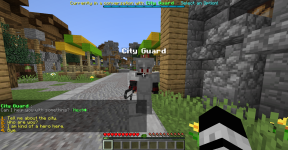
This plugin allows you to add dialogues to your NPCs, creating complex conversation trees. You can add different options to these conversations, so the player can continue talking to the NPC writing (or clicking) the number of the option in the chat.
What makes Interactions better than any other "conversation/dialogue/quests" plugin is that you have total control of the conversations you create. You can add requirements for an option to be selected, or even create "conditional dialogues" that will only be sent to the player if some conditions are met. You can also execute different actions to the player within a conversation, like giving him a potion effect or executing a command.
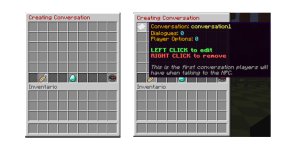
You can create and edit conversations ingame using the plugin GUI!
You can use this plugin as a support for many Quest plugins that don't have an extensive dialogue system!
FULL WIKI ON THIS LINK!
https://ajneb97.gitbook.io/interactions/
Utilities:
- ✓ GUI Inventory to create Conversations
- ✓ Command to start a conversation from any point
- ✓ Command to stop a conversation
- ✓ Command to verify plugin errors
- ✓ Prevent command and chat use while in conversation
- ✓ Prevent inventory interact while in conversation
- ✓ Prevent mob damage while in conversation
- ✓ Hide received chat messages while in conversation
- ✓ Command whitelist while in conversation
- ✓ BossBar feature while in conversation (1.9+)
- ✓ ActionBar feature while in conversation
- ✓ Variable to know if a player has reached to some dialogue
- ✓ 1.16 HEX Colors support for chat messages
Conversation Entities Properties:
- ✓ Name
- ✓ Starting points (NPCs or entities)
- ✓ Starting/Ending radius for conversations
- ✓ Enable slow (zoom) effect
- ✓ Block player movement
- ✓ Save conversation progress
- ✓ Permission to start conversation
- ✓ Cooldown for conversations
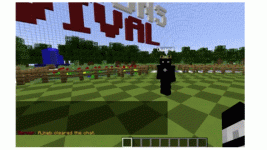
- ✓ Enable hologram dialogues
- ✓ Mutiple conversations
Conversation Properties:
- ✓ Multiple dialogues branches
- ✓ Multiple player options
- ✓ Enable random dialogues
Dialogues Properties:
- ✓ Configurable text lines
- ✓ Next/Skip dialogue button
- ✓ Center text variable
- ✓ Dialogue time
- ✓ Send options when dialogue finishes
- ✓ Start another conversation when dialogue finishes
- ✓ Multiple Actions (execute commands, play sound, send title message, give potion effect, and more!)
- ✓ Enable show conversation name
- ✓ Conditional Dialogues (based on PlaceholderAPI variables)
Options Properties:
- ✓ Option text
- ✓ Start conversation on option select
- ✓ Multiple Actions
- ✓ Requirements to show (based on PlaceholderAPI variables)
- ✓ Write option number in chat
- ✓ Clickable options
- ✓ Selectable options (W, S keys and SNEAK/JUMP)
Compatibility:
- ✓ Citizens (To start conversations from NPCs)
- ✓ PlaceholderAPI (For requirements using variables, and variables in dialogues)
- ✓ ProtocolLib (To completely block player movement while in conversation and completely hide chat messages while player is in a conversation)
- ✓ Holographic Displays (To enable hologram dialogues)
- ✓ Decent Holograms (To enable hologram dialogues)
- ✓ CMI (To enable hologram dialogues)
- ✓ Works with 1.8+
REQUIREMENTS:
1. Spigot or Paper (not craftbukkit)
2. Citizens (optional, to start conversations with NPCs) (https://www.spigotmc.org/resources/citizens.13811/)
3. PlaceholderAPI (optional, to manage requirements, https://www.spigotmc.org/resources/placeholderapi.6245/)
4. ProtocolLib (optional, to completely block player movement while in conversation, https://www.spigotmc.org/resources/protocollib.1997/)
5. HolographicDisplays (optional, to display hologram dialogues while in conversation, https://dev.bukkit.org/projects/holographic-displays/) or Decent Holograms (https://www.spigotmc.org/resources/96927/) or CMI (https://www.spigotmc.org/resources/3742/)
To install the plugin on your server just place the Interactions file inside your plugins folder and start your server. Examples files will be generated in the conversations folder, you can use them as a reference or delete them.
Use /interactions create <conversation> and /interactions edit <conversation> to start creating your first conversation!
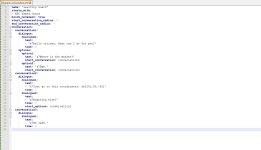
You can create and edit a conversation using the GUI inside the game, or maybe you will find more easily to edit everything on the configuration file of each conversation.
To a proper understanding of the plugin check the wiki below. Here you will find the whole plugin explained in detail.
FULL WIKI ON THIS LINK!
https://ajneb97.gitbook.io/interactions/
You can find a FULL EXAMPLE using the plugin Quests here:
https://ajneb97.gitbook.io/interactions/full-examples/quest-example
Spoiler: Chinese WIKI
Videos
English by @SoulStriker_
Spanish by me
Translations
Spanish [Click Here]
Russian [Click Here] - By @Sidka
Russian [Click Here] - By @FillNati
Chinese [Click Here] - By @Bean_Yuan
Spoiler: Conversation Entity
Spoiler: Conversation
Spoiler: Dialogue
Spoiler: Option
Spoiler: Conditional Dialogue
Alias: /int
/interactions help <page> Shows all commands.
/interactions create <conversation> Creates a new conversation for an entity.
/interactions edit <conversation> Edits an already created conversation.
/interactions delete <conversation> Deletes an already created conversation.
/interactions verify Checks ALL conversations for errors.
/interactions reload Reloads the plugin configuration files.
/interactions resetplayer <player> <conversation> (optional)<dialogue> Resets a conversation (or dialogue) for a player. The dialogue must be written like this: <conversation>.<dialogue>
/interactions list Shows all created conversation files.
/interactions start <conversation> <player> <x> <y> <z> <world> With this command you can start a conversation for a player. The location is optional and it works for using the leave radius option.
/interactions stop <player> Stops the current conversation of a player.
Permissions:
- interactions.admin (To access commands)
- interactions.start.<conversation> (Permission to talk to an NPC If requires_permission option is enabled on the conversation file)
- interactions.bypasscooldown.<conversation> (Allow players bypass the cooldown of a conversation)
Spoiler: Screenshots
Spoiler: Gifs
Please avoid posting bad ratings before asking. If you have problems or bugs with the plugin contact with me or post on the plugin discussion and I will take a look at it.
Terms & Conditions
By purchasing Interactions you agree to the following Terms & Conditions:
1) You can't resell/redistribute this plugin.
2) There are no refunds.
3) You can't decompile this plugin.
4) You can't claim this plugin as your own.
5) Only use this plugin on your server/network.
6) I can change the price of this plugin anytime.
-
 3fT3v93.png
 -
 C0eYXAc.png
 -
 giphy.gif
 -
 2SGPafp.png
 -
 8XgyO5r.png
 -
 ycBqa2q.jpg
 -
 Vg3iq0a.jpg
 -
 Vk5UvVa.png
 -
 2XRqjsM.png
 -
 SB2IFOI.png
 -
 giphy.gif
 -
 RqTQjmR.jpg


![DrawOnMap ⭐️ Drawing plugin with many tools ⭐️ ArtMap [1.16 - 26.1]](/data/resource_icons/22/22097.jpg?1789614679)